
 Download
 Browser
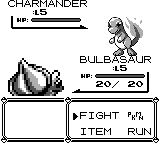
Your first sprite should read as a shape before it reads as detail. Start tiny, keep the silhouette clear, and check the result at 100% zoom — the same discipline Pokémon sprites used on the Game Boy.
What you'll make
A 16×16 or 32×32 character or creature with a clear outline and a short color ramp.
Steps
- Create a small canvas (16×16 or 32×32 works well).
- Pick colors from the palettes panel (
Shift+C) — four values is enough. - Block the silhouette with the pencil (
E) on a single layer. - Use
.to fit the sprite in view and check readability at 100%. - Add one shadow and one highlight only after the shape reads.
- Export as PNG when you are happy with the result.
Tips
- If it fails at 1× zoom, remove detail — do not add more.
- Enable Pixel Perfect on the pencil for clean 1px outlines — see the Pixel Perfect tutorial.
- Next: animate a walk cycle or hue-shift your ramp.
