
 Download
 Browser
Overview
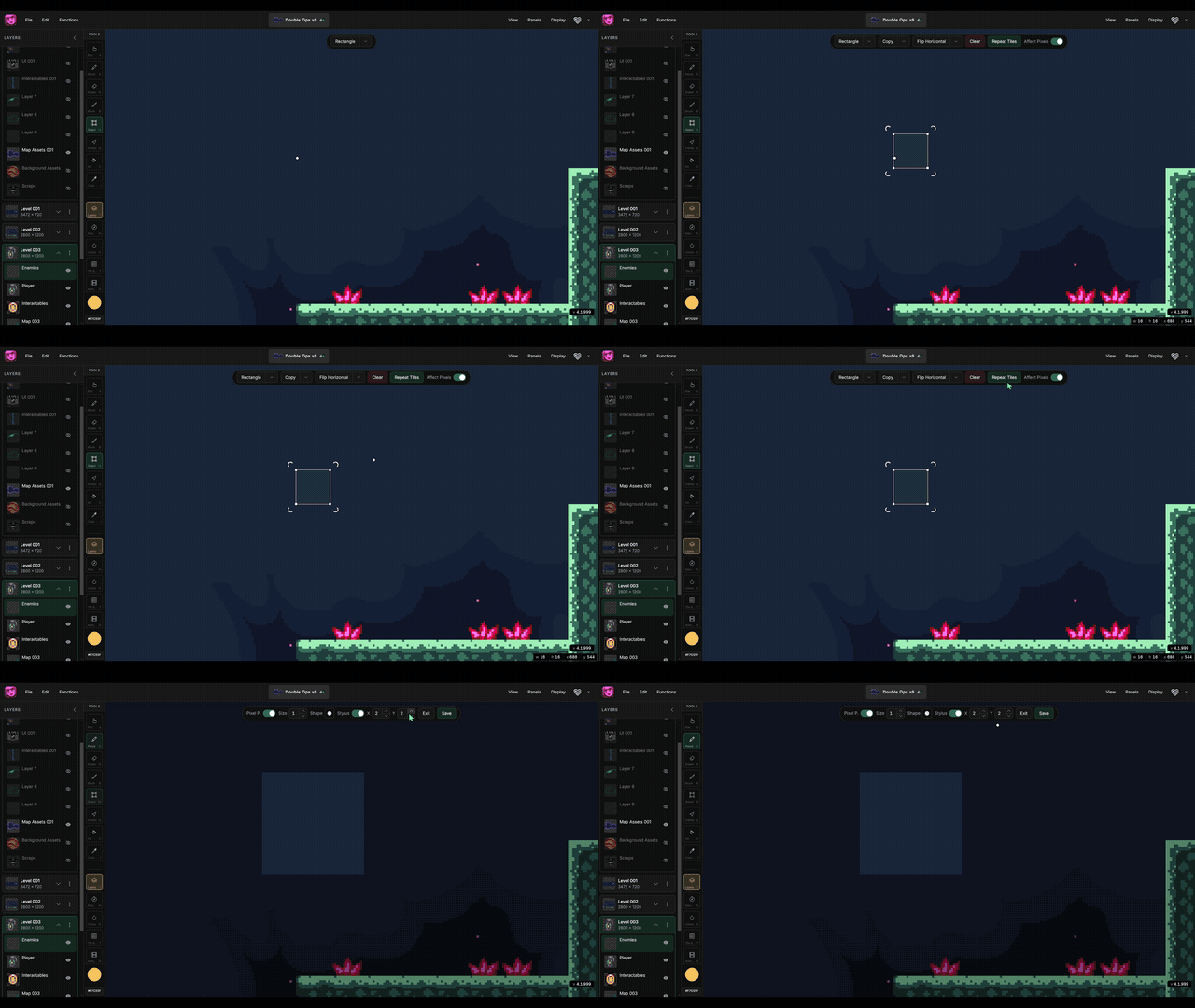
The clip in the header shows Repeat Tiles in action — a selection repeating across the canvas so seams and pattern rhythm are obvious while you still have the pencil ready.
Traditional tile workflows force a slow loop: draw one cell, export, paste nine copies in another app, spot a bad edge, go back, fix, repeat. Repeat Tiles keeps that feedback inside Manabit — game artists iterate on terrain and environment tiles in minutes, not hours.
The opportunity for pixel and game artists
Repeat Tiles is built on a simple idea: if it tiles on screen, it will tile in your game. Once you see your art repeated, seam errors become obvious — off-by-one pixels, color drift at edges, shapes that break rhythm when mirrored.
That unlocks workflows both pixel artists and level-minded game designers rely on:
- Validate tilesets before production — grass, stone, water, and wall tiles read correctly at a glance.
- Edit once, update everywhere — pencil and eraser strokes sync across every copy in the grid.
- Catch seams while you still enjoy drawing — fix problems during the art pass, not after the map is painted.
- Block environment mood early — designers preview how a texture feels across a floor or cliff face before committing to a full level.
- Ship asset packs faster — indie teams produce cleaner tiles with fewer revision rounds.
- Pair with Map Builder — perfect seams here, capture tiles there, stamp levels next.
- Choose your preview grid — set X and Y repeat counts to match the visual you need before you fix or save.
Choose how many tiles repeat on X and Y
After you turn on Repeat Tiles, Manabit shows X and Y controls on the selection bar. These set how many tile copies stretch horizontally and vertically around your selection — not a fixed 3×3 paste, but a preview you shape for the job.
Pixel artists use this to get a better read on the art:
- Small counts (e.g. 2×2 or 4×4) — zoom in on edge pixels and seam alignment without clutter.
- Large counts (e.g. 8×8 or wider) — see whether a pattern feels boring, noisy, or readable across a full floor or field.
- Asymmetric counts — many copies on X, few on Y (or the reverse) to preview wall strips, platform undersides, parallax bands, or horizontal terrain rolls.
The grid updates as you change the numbers, so you can dial in the view before you edit. Game design artists often crank X and Y until the repeat fills the screen like a slice of a real level — that is when rhythm problems and accidental motifs show up. Adjust, evaluate, then fix with the pencil while every copy still syncs.
For solo indie developers wearing both hats, Repeat Tiles is the bridge between “this pixel looks fine zoomed in” and “this tile works in a real room.”
Ways to create game art faster with Repeat Tiles
1. Seam-check every terrain tile
Select your grass, dirt, or sand tile. Enable Repeat Tiles and set X and Y to a modest grid (4×4 or 6×6 works well). Scan for visible lines where cells meet. Pixel artists use this as a final gate before adding a tile to a set — if the repeat looks boring or broken, fix it now.
2. Design walls and cliffs that tile horizontally
Game environments often need edges that repeat left-to-right. Set a wide X copy count and a narrow Y count to simulate a wall strip or platform underside. Game design artists judge readability: does the pattern feel intentional or accidentally noisy?
3. Test water, lava, and animated-style surfaces
Repeating organic textures exposes where noise clumps or creates accidental arrows. Even for static tiles, the grid preview shows whether motion would feel smooth — useful when you later animate frames or variants.
4. Fix seams with live pencil edits
While Repeat Tiles is active, draw and erase on the origin tile — changes propagate to every copy instantly. No duplicate layers, no manual cloning. Pixel artists adjust corner pixels until the grid disappears into a uniform surface.
5. Compare two versions quickly
Duplicate your tile idea on separate layers or iterations. Run Repeat Tiles on each and compare side by side. Game artists pick the version that reads best at gameplay scale, not just at 800% zoom.
6. Preview props that sit on repeating floors
Select a floor tile plus a sliver of adjacent context. Repeat to see whether furniture, shadows, or character silhouettes still read when the ground repeats. Level designers catch busy backgrounds early.
7. Build confidence before Map Builder
Repeat Tiles is the authoring step; Map Builder is the placement step. Clean repeats here mean faster stamping later — fewer ugly seams across an entire level.
8. Jam and prototype environments under time pressure
Game jam teams skip perfection but cannot skip readability. A quick Repeat Tiles pass on core floor and wall tiles prevents the “something feels wrong about this room” problem on hour six of a jam.
Who Repeat Tiles is for
| Role | What you gain |
|---|---|
| Pixel artist | Instant seam feedback; synchronized edits across the whole preview grid. |
| Game design artist | See how textures behave at scale before level layout is final. |
| Environment artist (2D) | Faster terrain and surface iteration for platformers, RPGs, and roguelikes. |
| Solo indie dev | One tool for draw → validate → capture → map, no export loop. |
| Art director (small team) | Fewer round-trips reviewing tile seams in Slack screenshots. |
Art types and game genres that benefit most
- Tilesets and terrain — grass, stone, sand, snow, brick, metal panels.
- Platformer and metroidvania levels — floors, walls, ceilings that must repeat cleanly.
- Top-down RPG and roguelike dungeons — floor patterns that cannot show grid lines.
- Strategy and puzzle boards — neutral tiles that stay calm when tiled 10×10.
- Background parallax strips — horizontal repeats for skies, caves, and interiors.
- Texture sheets for props — any surface meant to tile inside a larger sprite.
How pixel artists and game designers work together
On small teams, the same person often draws and layouts. On slightly larger indie studios, a pixel artist owns the tile art while a game design artist blocks levels. Repeat Tiles helps both:
- Artists deliver tiles that are technically seamless.
- Designers trust that stamped maps will not expose hidden flaws.
- Reviews happen on the repeated preview, not on a single 16×16 cell in isolation.
That shared preview language speeds handoff — fewer “this tile breaks on the map” bugs after integration in Unity, Godot, or GameMaker.
A mindset that saves time
- Repeat before you ship the tile — make tiling part of the art checklist, not QA.
- Fix seams with the pencil — small edge pixels usually solve it.
- Preview at game scale — zoom out until the grid fills the viewport like a room would.
- Save when it looks right — commit the session so the layer keeps your finished work.
- Then capture for Map Builder — seamless tiles become stamps, not one-off drawings.
Frequently asked questions
What is Repeat Tiles in Manabit?
Repeat Tiles duplicates your current selection as a grid preview on the canvas. While the mode is active, pencil and eraser edits on the tile sync across every copy so you can validate and fix repeating pixel art quickly.
Who should use Repeat Tiles — pixel artists or game developers?
Both. Pixel artists use it to perfect tile seams and surface detail. Game design artists use it to judge how textures read when repeated across a level. Solo devs often do both in one session.
How is Repeat Tiles different from Map Builder?
Repeat Tiles tests and edits a repeating pattern while you draw. Map Builder captures tiles into a library and stamps them across a level with the Brush. Use Repeat Tiles while making tiles; use Map Builder while building maps.
Does Repeat Tiles help with game jam art?
Yes. It is one of the fastest ways to confirm your core floor and wall tiles work before you paint an entire jam scene. Minutes of repeat preview save hours of repainting broken maps.
Can I fix seam errors without repainting the whole tile?
Yes. Edits in Repeat Tiles mode apply to all copies in the grid at once. Adjust edge pixels until the repeat looks seamless, then save the session to your layer.
What tile sizes work?
Any rectangular selection — common sizes are 8×8, 16×16, and 32×32, but multi-cell props can be repeated too if you need to preview a larger pattern.
Do I need Repeat Tiles if I only make characters and UI?
If you never draw repeating surfaces, you may skip it. If you ship environments, menus with patterned backgrounds, or tile-based UI frames, the repeat preview still saves time.
How does this fit into a Unity or Godot pipeline?
Repeat Tiles improves the source art you export as PNG. Cleaner tiles import into any engine tilemap or tileset workflow with fewer visible seams at runtime.
Can game design artists use this without deep pixel art skills?
Yes. Turning on Repeat Tiles is a visual test anyone can read: if you see a line or bump where cells meet, the tile needs work. You do not need to paint every pixel to evaluate the result.
Can I control how many tiles repeat on screen?
Yes. Use the X and Y controls on the selection bar while Repeat Tiles is active. Change how many copies appear horizontally and vertically to get the preview scale you need — close-up for seams, wide for floor readability, or one axis stretched for walls and strips. The grid updates as you adjust the values.
What is the fastest workflow with Map Builder?
Draw tile → Repeat Tiles to fix seams → add tile to Map Builder → stamp level with Brush → export PNG for your engine. Repeat Tiles is the quality gate in the middle.
Try Repeat Tiles: open the Manabit web app, draw a small tile, select it, and click Repeat Tiles on the selection bar.
